

I just moved all my newsletters from Mailchimp to a platform I run myself, based on Marc Lou’s open source MailCheap. I now pay for the emails I send instead of for every contact on my list. And the part I expected to be painful, Amazon SES, was a breeze.
Bye bye beehiiv
On 9 October, Marc Lou announced he had left beehiiv. It had raised its prices for the third time in two years: his first yearly bill was $1,000, and the next one would have been $4,000. So he vibe-coded his own platform on Amazon SES and MongoDB, for less than $300 a year.
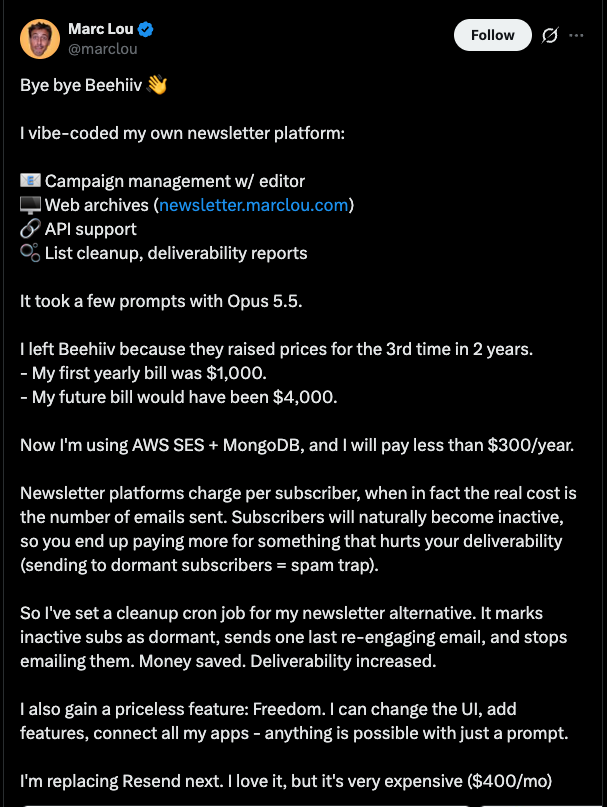
His argument is the interesting part. Newsletter platforms charge per subscriber, but what actually costs money is sending emails. Subscribers go quiet over time, so you pay more and more for people who end up hurting your deliverability.
Mailchimp bills the same way: by contact, with unsubscribed contacts counting toward your plan until you archive them. When Marc released his code as MailCheap, I took it and made it mine.
What I run
I started from Marc’s code on 12 October, and with Claude Code I was sending by the 14th. His version runs on Vercel, MongoDB and QStash. I moved mine onto Google Cloud and kept SES for sending:
- Hosting: Firebase App Hosting.
- Database: Firestore in MongoDB compatibility mode, which let MailCheap keep its MongoDB code with a few index changes.
- Background sends: Google Cloud Tasks.
- Sending: Amazon SES, from my own domain.
- Signups: plain HTML forms on my other sites, like the one at the end of this post.
My subscribers came over from a Mailchimp CSV export.
SES was a breeze
I had always heard SES was really complicated to set up, and on paper it is:
- Verify your sending domain with DKIM, a custom MAIL FROM domain and DMARC.
- Request production access. New accounts are stuck in a sandbox until AWS reviews your use case, and it usually answers within a day.
- Create a configuration set and an SNS topic, so bounces and complaints reach the app.
- Create an IAM user that can only send from that domain.
I connected Claude Code to the AWS MCP Server and let it work through the list, and it was a breeze. AWS’s reputation for complexity comes from its consoles and its jargon, and an agent that can read the docs and call the APIs does not care about either.
It is also really cheap. I was paying $13 a month on Mailchimp. Now I pay about 10 cents a month on SES, with unlimited contacts. SES costs $0.10 per 1,000 emails. A list of 10,000 readers getting 4 issues a month is 40,000 emails, so about $4. The rest of my setup is pay as you go:
| Piece | What it costs |
|---|---|
| Amazon SES | $0.10 per 1,000 emails |
| Firestore | Free tier to start, then pay per use |
| Google Cloud Tasks | First million tasks a month are free |
| Firebase App Hosting | Pay as you go, small for one instance |
The small print
- No support. MailCheap’s README says it plainly: self-hosters get no support, and issues are off. Bugs are mine to fix, which Claude Code makes quick.
- Deliverability is your job now. MailCheap pauses a campaign when bounces pass 2% or complaints pass 0.08%, and an old list has dead addresses. Gmail reports abandoned mailboxes as full, for instance. Those never empty, so I now treat them as hard bounces.
- I still depend on AWS and Google. But they are parts I can replace. I swapped Vercel, MongoDB Atlas and QStash out in a few hours.
Why owning your newsletter matters
An email list is the one audience with no algorithm between you and your readers. People gave you their address because they want to hear from you, so it makes little sense to rent access to them from a company that can change the price whenever it likes. Now the list, the issues and the stats sit in my own database, the emails go out from my own domain, and my bill depends on how much I send, not on how many people once signed up. I also have the code, so I can change anything without waiting for a feature request or a higher plan: in a few days I added signup forms on my other sites, one feed for all my newsletters and Slack pings for list events. Marc calls that freedom in his tweet, and he is right.
To see it work, use the form below: it goes straight to my own platform.
Update, 2 November: I have since done the same with analytics: I moved 9 websites off Google Analytics in an hour.