

I just moved all my Google Analytics projects, 9 websites, to an analytics tool I host myself on Cloudflare. It took one hour, it sets no cookies, and the data now sits in my own account. It all started with a tweet.
Half a million views for a copy
On 24 October, Ahmed Gagan announced DataBull, built to replace a $39 a month DataFast subscription and sold for a one-time $29.
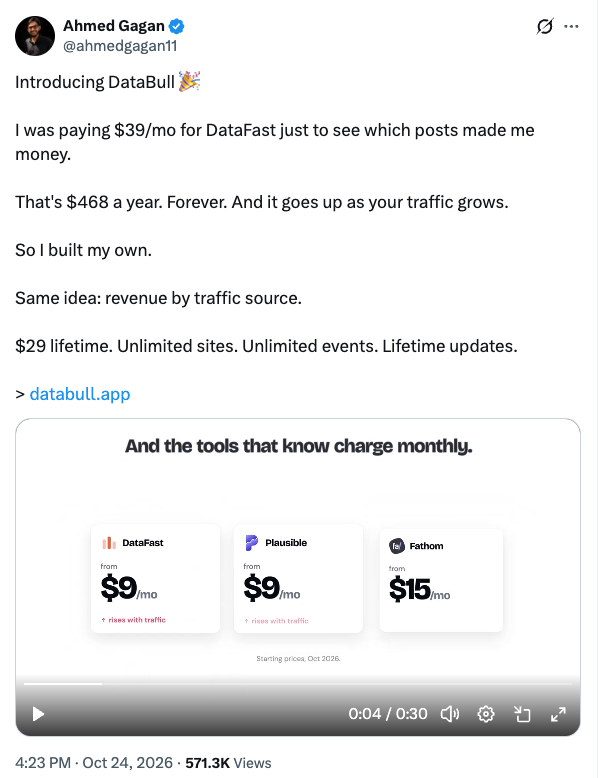
Over half a million people looked at what is basically a copy of an existing product with a different way of paying: once, on your own Cloudflare account. (DataBull has since gone up to $49, and the code is not open source.) That is how tired people are of the monthly bill, and DataFast’s plans grow with your traffic.
The funny part is that DataFast is made by Marc Lou, who did the same thing that same month. Fed up with paying more and more for newsletters, he released MailCheap, a much cheaper take on beehiiv: “Newsletters where you pay for the emails you send, not for dormant subscribers.” It is open source, you can host it yourself, and the newsletter on this blog already runs on it.
Analytics and newsletters have the same profile: the software is well understood, and the price climbs with your audience. That makes them an easy target for anyone willing to build their own.
The replies were the useful part
The replies pointed me to self-hosted analytics tools I did not know about. I wanted something easy to install on Cloudflare, with a dashboard as polished as Umami’s and live session tracking, running fully serverless so there is nothing to maintain.
- Umami (source) sets the bar for the interface, but self-hosting it means running a PostgreSQL database somewhere. That is exactly what I wanted to avoid.
- Minilytics runs on Cloudflare Workers and D1, but it is built for revenue attribution, like DataFast. It uses cookies to tie visitors to payments, and you deploy it from the terminal.
- Counterscale also runs on Cloudflare and stays minimal. Its README mentions neither live visitors nor sessions.
- InsightFlare is the one that fit. It runs entirely on Cloudflare (Workers, D1, Durable Objects), shows visitors in real time, lets you inspect every session, and is MIT licensed.
One button, one hour
This is the whole install guide:
Click it, and Cloudflare clones the repository and creates the resources. You fill in two secrets, a random string and an admin password, and about three minutes later the dashboard is up. There is no server to rent and no database to provision.
Then, for each website, you add it to the dashboard, paste the script tag and remove Google Analytics. On this Hugo site it is three lines, loaded in production builds only so local previews don’t count as visits:
{{- if hugo.IsProduction }}
<script defer src="https://your-analytics-domain/script.js?siteId=your-site-id"></script>
{{ end -}}
All 9 websites took me one hour. Maintenance should stay close to zero: the README says Cloudflare’s free quotas cover 100,000 visits a day, and its optional GitHub App opens a pull request when there is an update, so you only have to merge it.
The small print
- No cookies, but some storage. The tracker never touches cookies. It can keep a random visitor ID in localStorage, and the project says it adjusts how long that ID lasts according to regional privacy rules.
- One year of full detail by default. After that, data is compressed: you keep the trends but can’t filter them. An optional R2 bucket keeps older data queryable.
- Cloudflare still runs the machines. The data is in my account, on their infrastructure. The difference is that I can leave with it.
Why owning the data matters
Analytics is the record of who reads what you publish, and for years mine lived in someone else’s account, under someone else’s rules. Those rules change. When Google retired Universal Analytics, the historical data went with it unless you had exported it in time. In GA4, explorations and funnels reach back 14 months at most on a standard property. Now the numbers sit in a database in my own account: I decide how long they stay, I can export them whenever I want, nobody can reprice them or put them behind an upgrade, and my readers’ visits no longer pass through an ad company. Those numbers tell you what to write and build next, which is a good reason not to need anyone’s permission to keep them.
If you have a Cloudflare account, the button is here.